One environment variable made our llama.cpp server up to 21% faster
The llama.cpp server was waiting for Linux to hand out memory 4 KB at a time. Asking for huge pages, with one glibc variable and no code change, gave up to 21% more throughput and, in most setups, a faster first token.
- H100 and L4 · llama.cpp and Ollama · Qwen3.8-27B
- llama.cpp
- Linux
- huge pages
- page faults
GLIBC_TUNABLES=glibc.malloc.hugetlb=1 llama-server -m model.gguf ...That line gave our llama.cpp server up to 21% more requests per second, and in most setups a first token that arrives about a fifth sooner. No code change, no rebuild, and no root needed for the variable. We tested it on Qwen3.8-27B, one of the most used models in local AI.
Here is what the server was waiting for, and how to check whether yours is too.
What the server was waiting for
We build Tensward, an open-source tool that measures and tunes LLM inference. On an H100 serving tool-calling prompts, the GPU was doing real work less than half the time.
The cause was in ordinary RAM, not on the GPU. llama.cpp’s server remembers conversations: after it reads a prompt, it saves a snapshot of the model’s state, so a later request that starts the same way can skip that work. For this model a snapshot is about 150 MB, and a request can make several.
Each snapshot goes into brand-new memory. Linux hands out memory in 4 KB pages, and the first time a program writes to a page, the kernel stops it briefly to set that page up. That stop is a page fault. We counted about 124,000 of them per request in the L4 tool-calling test (145,000 on the H100).
The thread that writes the snapshots is the same one that keeps the GPU fed. While it waits for the kernel, the GPU waits for it.
The fix
Linux can also hand out memory in 2 MB pieces, called huge pages. On many systems it only does so when a program asks for them. The glibc variable above makes the server’s memory allocator ask.
Page faults fell from about 124,000 to about 1,850 per request, and on the L4 one snapshot took 46 ms instead of 80 ms.
What it gave back
Same model, same settings, only the variable different, with a fresh server for every run:
| Setup | Requests per second | Median first token |
|---|---|---|
| H100, tool-calling prompts | +21% | 22% sooner |
| H100, plain chat | +14% | 19% sooner |
| L4, tool-calling prompts | +6.5% | no clear change |
| L4, plain chat | +3.5% | 22% sooner |
The first token often improved more than throughput did. On the L4 with plain chat, throughput barely moved, but the first word came in 1.7 seconds instead of 2.2.
Why a faster card gains more
The wait for memory happens on the CPU, so it costs about the same whatever GPU you have: about 0.1 s per request in our tool-calling tests. But the H100 finishes a request every 0.52 s and the L4 every 1.60 s, so the same wait is a much bigger share of the H100’s time.
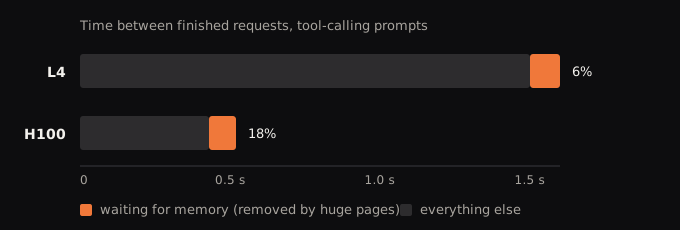
Drawn to scale from our tool-calling runs. Huge pages took 0.10 s off 1.60 s on the L4 (6%) and 0.09 s off 0.52 s on the H100 (18%). The cards ran different numbers of users and llama.cpp builds a few days apart, so read it as the pattern we saw, not a law: the faster your GPU, the more a fixed cost on the CPU side matters.
Where it does not help
It helps where the server saves a lot of state. Ollama, which runs llama.cpp inside, gained too, though less (2% to 7%, depending on the machine).
It did nothing we could measure for an 8B model in plain chat on an L4, which makes far fewer page faults. (With users returning to their own conversation the 8B did gain, +8.8% on the H100.) vLLM and SGLang, tested with an 8B model on an L4, barely fault at all, so there is nothing to remove.
The cost was small. Memory use on llama.cpp stayed within noise, no request failed, and answers matched the default about as often as two default runs match each other (within a margin we set in advance). On Ollama it cost about half a GB more RAM on average and a little more CPU.
The limits: the big gains are on one model family, the gain varies between machines of the same type, and our longest runs were half an hour. The full list is in the report.
Try it yourself
You need glibc 2.35 or newer (Ubuntu 22.04, Debian 12 or later) and a huge-page mode of madvise or always:
ldd --version
cat /sys/kernel/mm/transparent_hugepage/enabled
Start the server with the variable. For Ollama started by hand, set it on ollama serve:
GLIBC_TUNABLES=glibc.malloc.hugetlb=1 llama-server -m model.gguf -np 8 ...
GLIBC_TUNABLES=glibc.malloc.hugetlb=1 ollama serve
Under load, check that it took effect (as the server’s user, or with sudo). This number should be well above zero:
grep AnonHugePages /proc/$(pidof -s llama-server)/smaps_rollupTo see whether you have the problem at all, count page faults before and after a load and subtract. If the count barely grows, huge pages likely will not help you:
ps -o min_flt= -p $(pidof -s llama-server)Then run the same load with and without the variable a few times each, alternating, and compare.
Full numbers, builds, method and limits are in the technical report.