llama.cpp was caching Inkling 2 Mini's experts three times over
Inkling 2 Mini runs its middle layers three times per token over the same weights, and llama.cpp's expert cache stored each pass separately. One entry per expert takes the 8-bit file from 15.6 to 25.8 tokens per second on a 24 GB card it does not fit, with bit-identical output.
- L4 · llama.cpp · Inkling 2 Mini
- llama.cpp
- MoE
- expert offload
- Inkling 2 Mini
The short version
- Inkling 2 Mini runs its 12 middle layers three times for every token, over the same weights.
- When the model is larger than your GPU, llama.cpp keeps the expert weights in RAM and a cache of the busiest experts on the card. That cache treated each of the three passes as a separate layer, so one expert could be uploaded and stored three times.
- With one cache entry per expert, the 8-bit file (27.8 GB, on a 24 GB card) goes from 15.6 to 25.8 tokens per second. The 4-bit file with an 8 GB cache goes from 19.2 to 28.4. The output does not change by a single bit.
A model that loops
Inkling 2 Mini is a mixture-of-experts model. Each layer holds 128 small sub-networks, the experts, and a router picks 8 of them for every token. So although the model has about 26 billion weights, a token only touches a few billion of them.
Its unusual part is the loop. The model has 24 layers, and layers 6 to 17 are applied three times per token. That makes 48 layer applications from 24 layers of weights. The three passes use the very same weights; only the data flowing through them differs.
What happens when the model does not fit
The 4-bit file is 17.6 GB and the 8-bit file is 27.8 GB. On an 8, 12 or 16 GB card, or with the 8-bit file on a 24 GB card, something has to stay in system memory.
llama.cpp has a good answer for expert models. --cpu-moe keeps the expert weights in RAM, and --moe-cache-mib reserves part of the card as a cache for the experts used most. When a layer needs an expert that is not in the cache, that is a miss: the expert is uploaded to the card, and something else is evicted.
Uploads are what make this slow. We measured the time per token as a straight line: a fixed part, plus about 0.4 ms (4-bit) to 0.7 ms (8-bit) for every miss. Stock llama.cpp made 43 to 58 misses per token in our runs. Fewer misses is the whole game.
The log line that gave it away
This is what stock llama.cpp prints when it loads the 4-bit file with an 8 GB cache:
load_tensors:    CUDA_Host model buffer size = 15535.31 MiB
impl:      CUDA0 MoE cache size =  8182.27 MiB for 28188.00 MiB of host experts
impl: 44 layers, iq4_nl:  1635 slots (29.0%, 4.6 tokens worth)
The host buffer is 15.5 GB. The cache believes it is serving 28 GB of experts. Both cannot be true.
The cache keeps its books per layer application: 48 of them. For the looped layers it therefore sees three sets of experts where there is one, and it will happily upload the same expert once for pass 1, again for pass 2 and again for pass 3, and hold all three copies in a cache that is short of space to begin with.
Do the passes really want the same experts?
If each pass picked completely different experts, the triple bookkeeping would cost nothing. So we recorded which experts every pass chose, for 2,045 tokens.
- Pass 1 and pass 2 pick the same expert 62% of the time.
- Pass 1 and pass 3: 45%. Pass 2 and pass 3: 54%.
- Across the three passes, a looped layer asks for 24 experts per token, and only about 14 of them are different.
So about four in ten requests in the looped layers are for an expert that an earlier pass of the same token just used.
The fix
The cache now gives layers that read the same weights one shared entry per expert.
- It recognises shared weights from the weights themselves, not from the model’s name. A model without shared layers behaves exactly as before.
- It is 84 lines in one file, with a switch to turn it off (
LLAMA_MOE_CACHE_DEDUP=0). - The same change makes the start-up line honest: 15,066 MiB of host experts, not 28,188.
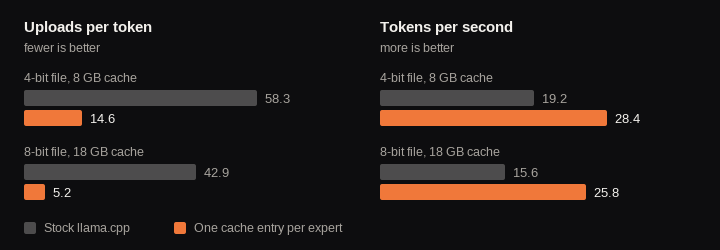
| Stock llama.cpp | One entry per expert | |
|---|---|---|
| 4-bit file, 8 GB cache: tokens per second | 19.2 | 28.4 |
| 4-bit file, 8 GB cache: misses per token | 58.3 | 14.6 |
| 8-bit file, 18 GB cache: tokens per second | 15.6 | 25.8 |
| 8-bit file, 18 GB cache: misses per token | 42.9 | 5.2 |
| Prompt processing, 4-bit / 8-bit: tokens per second | 23 / 17 | 45 / 39 |
With a 13 GB cache, the offloaded 4-bit model runs at 32.2 ms per token against 30.3 ms with everything on the card: about 94% of the full speed with roughly 2 GB less GPU memory in use.
We knew the number before we built it
Before writing any engine code we replayed the recorded routing through a copy of llama.cpp’s own cache policy, once keyed the stock way and once keyed per expert.
| Predicted | Measured | |
|---|---|---|
| 4-bit, 8 GB cache: misses per token | 15.4 | 14.6 |
| 4-bit, 8 GB cache: ms per token | 35.1 | 35.2 |
| 8-bit, 18 GB cache: misses per token | 6.0 | 5.2 |
| 8-bit, 18 GB cache: ms per token | 39.1 | 38.8 |
The replay took minutes at a desk. It is the reason we were willing to spend GPU time on the build.
Is the output really the same?
A cache should never change the answer, so we checked that it does not.
For every patched run we compared against the stock run of the same file and cache size: the generated text, and for each of the 2,048 generated tokens the log-probability of the chosen token and of the 8 next-best candidates. Every value is bit-equal. For the 4-bit file the patched runs are also bit-equal to a run with the whole model on the GPU.
What to know before you try it
- Two extra flags are needed today. With expert weights in RAM, current llama.cpp builds can produce garbage output for this model (issue #32710).
--no-op-offload -ub 32 -b 32avoids it, and every number here uses those flags. They cost prompt speed: with everything on the card, prompt processing drops from 527 to 247 tokens per second. - Use
--load-mode none. It keeps the weights in locked memory, and uploads run at the full speed of the link. Without it the same run was 1.74 times slower. - This is one card and one model: an NVIDIA L4 (24 GB), llama.cpp build b12603, four prompts of 512 tokens. The 8-bit timings vary by several percent between runs, so read 15.6 to 25.8 as “34 to 41% less time per token”.
- It is not merged. We reported it as issue #32744, with the change on a branch.
Do it yourself
Build llama.cpp from the branch:
git clone -b moe-cache-shared-experts https://github.com/adishik/llama.cpp
cd llama.cpp
cmake -B build -DGGML_CUDA=ON -DCMAKE_BUILD_TYPE=Release
cmake --build build -j --target llama-server
Run the model with experts in RAM and a cache sized to what your card has free (here 8 GB):
build/bin/llama-server -m Inkling-2-Mini-IQ4_NL.gguf -ngl all --fit off -c 8192 \
  -ub 32 -b 32 --no-op-offload --load-mode none --jinja \
  --cpu-moe --moe-cache-mib 8192
Then look at two things in the log:
- At start-up, the “MoE cache size … for … MiB of host experts” line should match the size of the host buffer above it.
- At exit, the “ubatch <= 8: hits = …, misses = …” line. Divide the misses by the tokens you generated. Run again with
LLAMA_MOE_CACHE_DEDUP=0in front of the command to see the stock behaviour on the same build.
The model files are in ggml-org/Inkling-2-Mini-GGUF.
Why this is bigger than one model
Inference engines are built on a quiet assumption: one layer, one set of weights. A looped model breaks it, and the engine’s bookkeeping pays for work it does not need to do. The cache is one place where that shows.
Because the fix looks at the weights and not at the model’s name, the next model that reuses its layers gets it for free.